Table of Contents
The best crypto tax software for most stablecoin users is Koinly: on 14 November 2026 its $99 Hodler plan covered up to 1,000 transactions for a tax year, it syncs TRON wallets by public address, and it says its users come from more than 140 countries (Koinly). CoinTracker suits people earning daily stablecoin interest who also need past years filed, CoinLedger suits US filers who want the widest choice of tax-filing exports, Awaken suits DeFi and bridge users, and TokenTax suits high-volume traders.
The reason stablecoin users should compare these tools carefully is how they count transactions. Daily interest credits on a USDC balance can add 365 transactions a year, and some tools charge for them while others exclude them. For US filers, the IRS says digital assets, which it says include stablecoins, are property, and that digital asset transactions must be reported whether or not they produce a gain or loss (IRS).
Last updated: 14 November 2026. Plan prices and counting rules re-checked against vendor pricing pages and help centres on this date.
Key Takeaways
- In our worked example of a stablecoin saver with 575 transactions, 365 of them daily USDC interest credits, Koinly and CoinLedger cost $99 and CoinTracker, Awaken and TokenTax cost $199 (worked example).
- CoinTracker excludes staking rewards and interest from its transaction count on Prime ($199) and above, while interest is counted on its $59 and $99 Base plans (CoinTracker).
- CoinLedger deducts up to $25 worth of micro-transactions such as interest payments from its billable count; Koinly says most small-value reward deposits do not count (CoinLedger; Koinly).
- CoinTracker and Awaken include past years' reports with one purchase; Koinly and CoinLedger sell each tax year separately (CoinTracker; Awaken; Koinly; CoinLedger).
- Under the IRS optional method, a US broker does not have to report a customer's designated stablecoin sales if they total $10,000 or less for the year, and rewards and staking payments are not reported on Form 1099-DA (IRS Form 1099-DA instructions).
Which crypto tax software is best for stablecoin users?
The best crypto tax software for stablecoin users depends on how many transactions you have and what kind they are. The table compares the five tools on plan prices and the counting rule that matters most for stablecoin interest. Each row links to the page we read.
| Tool | Best for | Price per tax year (USD) | Stablecoin interest in the count |
|---|---|---|---|
| Our pick: Koinly | Most stablecoin holders, including outside the US | $49 (100 tx), $99 (1,000), from $199 (3,000+) | Most small reward deposits excluded |
| CoinTracker | Daily interest earners catching up on past years | $59 (100), $99 (250), $199 (1,000), $299 (2,500) | Excluded on Prime and above; counted on Base |
| CoinLedger | US filers using TurboTax, TaxACT, H&R Block or TaxSlayer | $49 (100), $99 (1,000), $199+ (3,000+) | Counted, minus up to $25 worth |
| Awaken | DeFi, Solana and bridge users | $99 (300), $199 (1,000), $299 (2,500) | No exclusion stated |
| TokenTax | High-volume traders and people who want CPA filing | $49 (100), $199 (5,000), $1,999 (20,000) | No exclusion stated |
Two patterns stand out. Between 100 and 1,000 transactions, prices cluster at $99 to $199, so the counting rules decide which plan you land on. Above that, TokenTax's Premium plan covers the most transactions for $199 of any tool here: up to 5,000.
| Tool | Billing and refunds | Countries (vendor figure) | TRON (USDT) import |
|---|---|---|---|
| Koinly | One-time per tax year; plan valid 10 years; refund within 7 days if no report generated (help; pricing) | Users in 140+ countries | Public address or CSV |
| CoinTracker | Annual plan that auto-renews; refund within 30 days if no forms downloaded (pricing) | 40+ countries | Public address |
| CoinLedger | One-time per tax year; 14-day money-back guarantee with conditions (help) | International reports offered | CSV or read-only API |
| Awaken | Annual subscription, never auto-charged (pricing) | 55+ countries | Listed; fewer chains than rivals by its own account |
| TokenTax | Per tax year; multi-year discount (help) | IRS forms or relevant international report | API or CSV for any chain, per TokenTax |
How much does crypto tax software cost for a stablecoin user?
Crypto tax software costs a typical stablecoin saver $99 to $199 a year in our example, and an active stablecoin trader $199 to $299. Both cases assume one tax year, no earlier history in the tool, list prices in USD as shown on 14 November 2026, and no promo codes.
- Saver: 120 trades or swaps, 60 card or merchant payments, 30 transfers between own wallets, and 365 daily interest credits on $10,000 of USDC at an assumed 4% a year (about $1.10 a day). Total: 575 transactions, 210 of them not interest.
- Trader: 1,800 trades, 60 payments, 100 own-wallet transfers and the same 365 interest credits. Total: 2,325 transactions, 1,960 of them not interest.
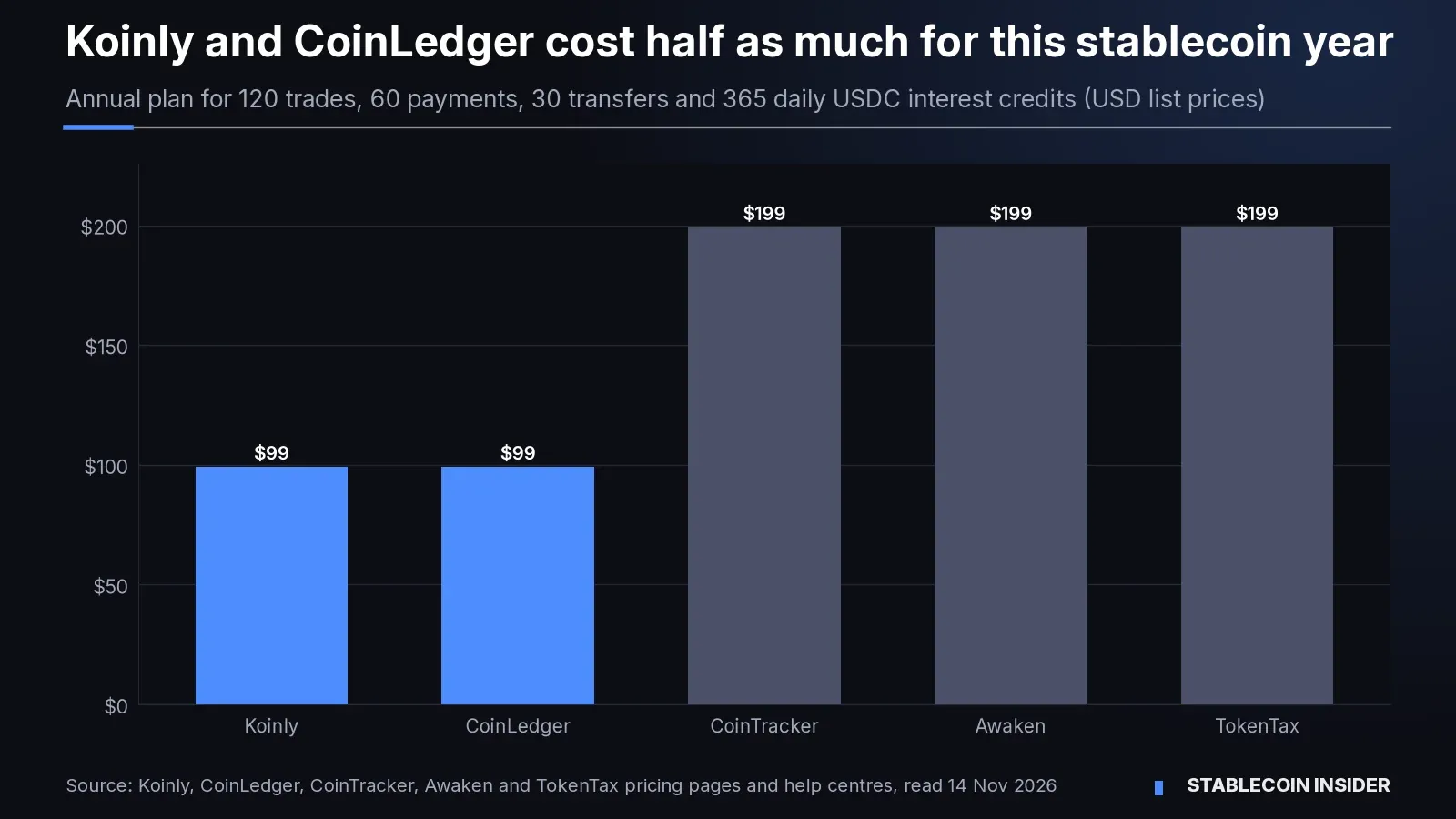
| Tool | Saver (575 tx) | Trader (2,325 tx) |
|---|---|---|
| Koinly | $99 Hodler (1,000), with or without the interest credits | $199 Trader (3,000) |
| CoinLedger | $99 Investor (about 553 billable after the $25 deduction) | $199 Pro (3,000) |
| CoinTracker | $199 Prime: 575 is over Base+'s 250, and Prime excludes interest | $299 Prime+ (1,960 counted, cap 2,500) |
| Awaken | $199 Dolphin (1,000) | $299 Dolphin (2,500) |
| TokenTax | $199 Premium (5,000) | $199 Premium (5,000) |
How we got the numbers: CoinTracker counts interest on Base and Base+ but excludes staking rewards and interest on Prime and above, so the saver lands on Prime (CoinTracker). CoinLedger deducts up to $25 worth of micro-transactions, which at $1.10 a credit removes about 22 of the 365 (CoinLedger). Koinly says the majority of small-value reward deposits do not count; we priced it both ways and the plan did not change (Koinly). Awaken and TokenTax do not state an exclusion for interest, so we counted every credit (Awaken; TokenTax).
The practical lesson: if you earn daily stablecoin interest, check whether a tool counts those credits before picking a plan by your trade count alone. The cheapest plan on paper can be the wrong tier.
Koinly: best for most stablecoin holders
Best for: individuals who hold, spend and swap stablecoins across exchanges and wallets, including users outside the US.
Koinly is free until you need a report. Paid plans are one-time payments for one tax year: $49 for 100 transactions, $99 for 1,000 and from $199 for 3,000 or more, with 1,000-transaction top-ups above 10,000 (Koinly). A plan must cover that year's transactions and, together with your other plans, your account-wide total, with a 1,000-transaction margin for earlier years (Koinly help). TRON wallets sync from a public address or import by CSV (Koinly TRON), and it accepts payment in USDC or DAI as well as cards (Koinly).
- Pros: $99 covers up to 1,000 transactions; most small reward deposits excluded; no subscription; plans valid for 10 years; wide country coverage.
- Cons: each tax year is a separate purchase; the account-wide limit can push you into a bigger plan if you import years of history; "majority of dust rewards" is not defined in dollar terms.
CoinTracker: best for daily interest earners with past years to file
Best for: users who earn stablecoin interest or staking rewards every day, and anyone catching up on several unfiled years.
CoinTracker prices by transactions in the year you file: Base $59 (100), Base+ $99 (250), Prime $199 (1,000), Prime+ $299 (2,500), Ultra $499 (10,000) and Ultra+ $999 (25,000). Prime and above exclude all staking and interest from the count, and one purchase covers forms for every past year (CoinTracker). Paid plans include 1099-DA reconciliation and TurboTax and H&R Block integrations, and you can pay in USDC (CoinTracker).
- Pros: interest and staking excluded from Prime up; past years included; reconciles against exchange 1099-DA forms; TRON wallets import by public address.
- Cons: plans auto-renew unless switched off; Base and Base+ count interest, so savers jump straight to $199; tax-loss harvesting starts at Prime.
CoinLedger: best for US filers who use mainstream tax software
Best for: US filers who want to import results into TurboTax, TaxACT, H&R Block Desktop or TaxSlayer.
CoinLedger charges $49 for 100 transactions, $99 for 1,000 and $199 or more for 3,000 or more, and each tax year is a separate purchase (CoinLedger; CoinLedger help). Its billable count includes trades, fees, interest and other income, payments and transfers, but not self-transfer deposits and withdrawals, and it deducts up to $25 worth of micro-transactions (CoinLedger help). TRON data imports by CSV or read-only API (CoinLedger TRON).
- Pros: $99 for up to 1,000 transactions; non-taxable self-transfer deposits and withdrawals are not billed; the longest list of named tax-software exports of the five; unlimited report revisions.
- Cons: the $25 deduction is small for a saver earning interest daily; each year bought separately; refunds depend on conditions in its policy.
Awaken: best for DeFi and bridge users
Best for: on-chain users on EVM chains and Solana who bridge stablecoins, use liquid staking or trade on DeFi.
Awaken charges $99 a year for 300 transactions, $199, $299 or $399 for 1,000, 2,500 or 5,000, and $599 to $999 for 10,000 to 50,000 (Awaken). It counts only the current tax year and includes reports for past years (Awaken help). Its settings let users treat wrapping, bridging and liquid staking as non-taxable, for example USDC moved from Ethereum to Solana, a position Awaken says is supported by a Fenwick & West legal analysis (Awaken help).
- Pros: past years included; DeFi, NFT and staking support on every plan; bridging toggle for multi-chain USDC users; never auto-charges.
- Cons: says it supports fewer chains than most competitors (Awaken help); no stated interest exclusion; non-taxable toggles are filing positions to agree with a tax adviser.
TokenTax: best for high-volume traders
Best for: traders with thousands of stablecoin trades a year, and people who want an accounting firm to prepare the return.
TokenTax sells Basic at $49 for 100 transactions, Premium at $199 for up to 5,000 and Pro at $1,999 for up to 20,000; its VIP plan adds two 30-minute expert consultations and covers up to 30,000 exchange transactions (TokenTax). Limits are per tax year, and historical imports still count against the allowance (TokenTax help). TokenTax describes itself as a full-service accounting firm whose CPAs and EAs can file the return, as a separate add-on (TokenTax; TokenTax help).
- Pros: 5,000 transactions for $199; full filing available as an add-on; FBAR reports available; multi-year discount.
- Cons: Basic stops at 100 transactions; the next step above Premium is $1,999; CSV imports and the tax-loss harvesting dashboard start at Premium.
What should stablecoin users check before choosing a tool?
Stablecoin users should check three things before choosing a tool: how it counts interest, whether it covers the chains they use, and what their exchange will and will not report. The third matters because the IRS lets US brokers use an optional method for qualifying stablecoins. Under it, a broker does not have to report a customer's designated stablecoin sales that total $10,000 or less for the year, and when it does report them, it can report the total without cost basis or dates (IRS).

The same instructions say rewards and staking payments are not reported on Form 1099-DA, and Notice 2024-57 lets brokers skip reporting lending, staking, wrapping and liquidity-provider transactions for now (IRS). None of that removes the filer's own duty to report (IRS). Fees count too: the IRS treats a transfer between your own wallets as a digital asset transaction when the fee is paid in a digital asset, such as the TRX burned on a USDT transfer on TRON.
For the rules themselves, see what the IRS expects from stablecoin holders in 2026 and the five IRS stablecoin tax changes for 2026. If you need to trace a single payment for your records, our guide on checking a USDT or USDC transaction on a block explorer walks through it.
How we chose
We chose these five with four tests applied on 14 November 2026: the tool must produce US tax forms or international reports for individuals, publish its prices and how it counts transactions, import stablecoin activity from exchanges and chains such as TRON, and be priced for individual filers rather than only businesses. Summ, the former Crypto Tax Calculator whose site now redirects to summ.com, was left out because its pricing page blocked our automated reader, so we could not verify its prices. We did not test imports, and accuracy on your own data can differ.
Comparing where that interest comes from? See stablecoin savings accounts compared and why stablecoin yields are not comparable.
For the full picture, see our Stablecoin regulation hub.
FAQ
Do I need crypto tax software if I only bought and held USDC?
Is swapping USDT for USDC a taxable event?
Can I pay for crypto tax software with stablecoins?
Does bridging USDC between chains create a taxable event?
Stablecoin Insider's verdict
Koinly is our pick for most stablecoin users: $99 covered up to 1,000 transactions on 14 November 2026, most small reward deposits are excluded, and it syncs TRON wallets by address. Choose CoinTracker if you earn interest daily and have past years to file, CoinLedger if you file in the US through mainstream tax software, Awaken if you bridge and use DeFi on EVM chains or Solana, and TokenTax if you trade thousands of times a year or want an accountant to file.
Sources: Koinly pricing; Koinly: how pricing works; Koinly TRON integration; CoinTracker pricing; CoinTracker TRON integration; CoinLedger pricing; CoinLedger pricing help; CoinLedger TRON integration; Awaken pricing; Awaken pricing help; Awaken integrations; Awaken supported chains; Awaken transaction toggles; TokenTax pricing; TokenTax plan guide; TokenTax integrations; IRS digital assets; IRS Instructions for Form 1099-DA (2026). All read on 14 November 2026.
This content is provided for informational and educational purposes only and doesn't constitute financial, investment, legal or tax advice. Prices and plan rules were read on 14 November 2026, are list prices in US dollars and change; the worked example uses stated assumptions and does not test any tool's accuracy. Companies and assets mentioned: Koinly, CoinTracker, CoinLedger, Awaken, TokenTax, Summ, Fenwick & West, the IRS, USDC, USDT, DAI and TRX. None of the listings in this article is a paid placement.