Table of Contents
To check a USDT or USDC transaction, copy its transaction hash (TXID) from your wallet or exchange, paste it into the block explorer for the network it was sent on, such as Etherscan for Ethereum or Tronscan for TRON, and read four fields: status, token contract, recipient and amount. Then check that the block is final.
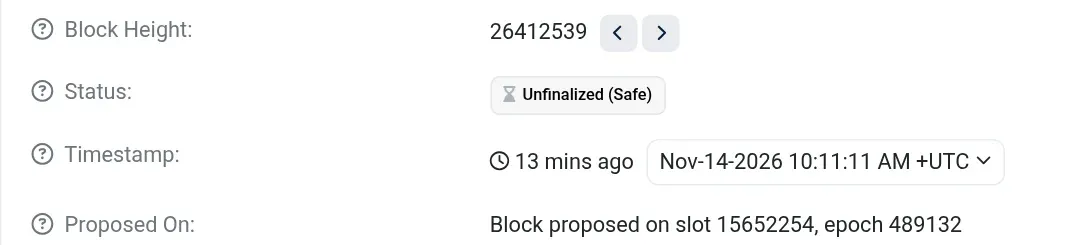
That last step is the one most people skip. On 14 November 2026 we followed a real 900 USDT withdrawal on Ethereum: Etherscan showed "Success" and "Confirmed within 1 sec", yet its block was still marked "Unfinalized (Safe)" 13 minutes later. This guide walks through that transaction field by field, decodes its $0.19 fee, compares a TRON transfer, and lists how many confirmations Kraken waits for on each network.
Last updated: 14 November 2026. Explorer pages, on-chain data, fees and Kraken deposit rules re-checked on this date.
Key Takeaways
- On a token transfer, Etherscan's "Interacted With (To)" field is the token contract. The real recipient and amount sit under "ERC-20 Tokens Transferred".
- "Value: 0 ETH" is normal for a USDT or USDC transfer. A failed transaction still costs its gas fee.
- Our example Ethereum USDT transfer used 46,097 gas and cost 0.0000976 ETH, about $0.19. Most of that was the 2 gwei tip the sender chose, not the network base fee.
- Confirmations are not finality. Ethereum finalizes in about 13 to 16 minutes under normal conditions; TRON solidifies a block in about one minute.
- Exchanges add their own threshold: Kraken lists about 20 minutes for USDT and USDC on Ethereum and 20 confirmations, "near-instant", for USDT on TRON.
Where do you find the transaction hash?
You find the transaction hash in the sending wallet's activity list or in the exchange's withdrawal history, usually labelled TXID, Tx hash or transaction ID. Exchanges often link it straight to an explorer. If you are the recipient, ask the sender for it; your own address page on the explorer also lists incoming transfers.
The hash only works on the explorer for the network it was sent on. An Ethereum hash starts with 0x, like our example; a TRON transaction ID is 64 hexadecimal characters without the prefix. Ethereum, Base, Arbitrum and Polygon all use 0x addresses, so if a hash is "not found", try the other networks the sender supports before assuming it failed.
How do you read a USDT or USDC transaction on Etherscan?
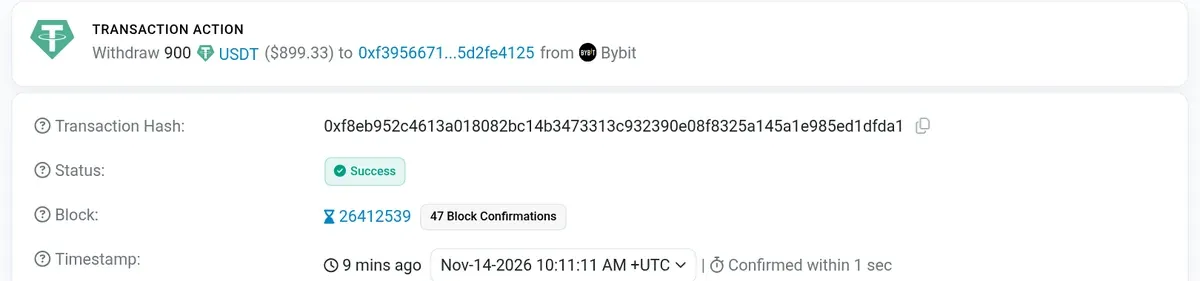
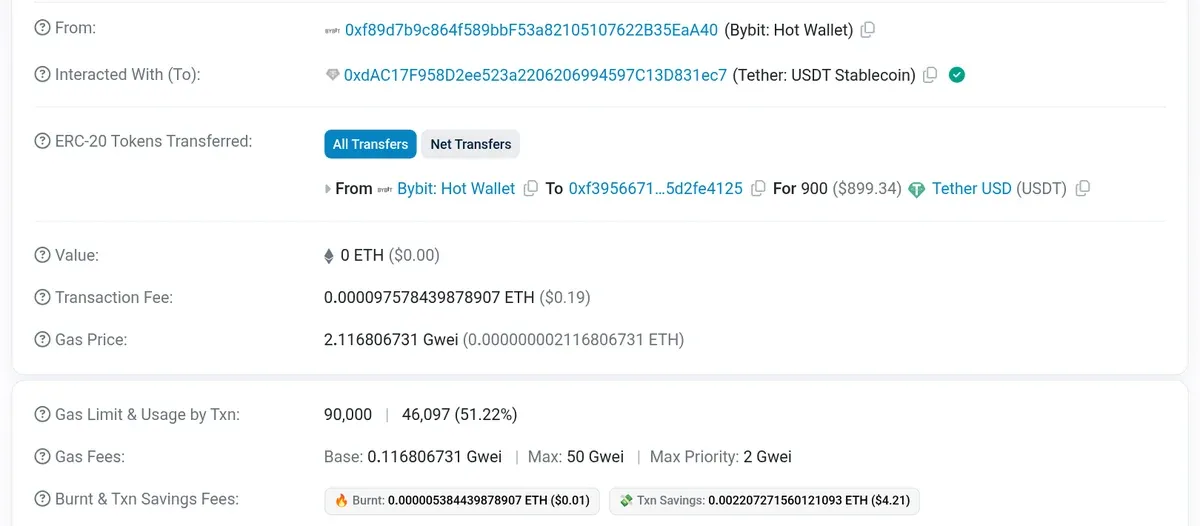
You read a USDT or USDC transaction on Etherscan by checking five fields in order: status, block confirmations, the contract it interacted with, the tokens transferred and the fee. Etherscan says a transaction can show as Successful, Pending, Failed or Dropped, and a dropped one can be Replaced (Etherscan). The screenshots below are from a 900 USDT transfer captured at 11:20 CET on 14 November 2026.
1. Status: did the network execute it?
Status shows whether the network executed the transaction. "Success" means it was included in a block and ran. "Fail" means it was included but reverted, and the gas is gone anyway: ethereum.org says the fee "is paid regardless of whether a transaction succeeds or fails" (ethereum.org). "Pending" means it is still waiting to enter a block.
2. Block and confirmations: how deep is it?
Block and confirmations show how many blocks have been added on top of yours. Our transfer sat in block 26,412,539 with 33 confirmations at 11:17 CET and 47 at 11:20 CET. More confirmations make a reorganisation less likely, but on Ethereum the count is not the same as finality, as the next section shows.
3. Interacted With: is it the real token?
The "Interacted With (To)" field tells you which contract the sender called, and on a token transfer that is the token itself, not the person paid. Here it reads 0xdAC17F958D2ee523a2206206994597C13D831ec7, which matches the Ethereum USDT address on Tether's supported-protocols page. For USDC, compare it with Circle's contract address list. A different address means a different token, whatever its name says.
4. Tokens Transferred: who received how much?
The "ERC-20 Tokens Transferred" row shows the actual movement: from Etherscan's labelled "Bybit: Hot Wallet" to the recipient's address, for 900 USDT. Check every character of the recipient against the address you expected, not just the first and last few. Because the USDT moved inside the token contract, the "Value" row correctly reads 0 ETH.
5. Transaction fee: what did it cost?
The fee row shows what the sender paid in ETH for the whole transaction. Expanding "More details" splits it into gas used, base fee and tip, which is what the worked example below uses.
What did this USDT transfer actually cost?
This USDT transfer cost 0.0000975784 ETH, or about $0.19 at Etherscan's displayed price and $0.186 at CoinGecko's $1,907.98 ETH price read at 11:19 CET. Ethereum charges gas used multiplied by the price per unit of gas, split into a burned base fee and a tip to the validator (ethereum.org).
| Item | From Etherscan | Approx. USD |
|---|---|---|
| Gas used | 46,097 of a 90,000 limit | — |
| Base fee (burned) | 46,097 × 0.1168 gwei = 0.0000054 ETH | $0.010 |
| Priority tip (to validator) | 46,097 × 2 gwei = 0.0000922 ETH | $0.176 |
| Total fee | 46,097 × 2.1168 gwei = 0.0000976 ETH | $0.186 |
Two things stand out. First, about 94% of the fee was the tip the sender set; the network's base fee alone would have cost about one cent. Second, the 46,097 gas is specific to this transfer. Other single USDT transfers we read from the same block used 63,197 to 63,209 gas, so treat this as one data point, not a standard price.
Does "Success" mean the stablecoins have arrived?
"Success" means the stablecoins are in the recipient's address on the current chain, but not yet that the block is final. On Ethereum, blocks become final only at epoch checkpoints; the Ethereum Foundation's consensus blog puts the minimum at 768 seconds and the expected time at about 960 seconds, or 16 minutes (Ethereum Foundation). Once final, reverting a block would require an attacker to destroy at least a third of all staked ETH (ethereum.org).
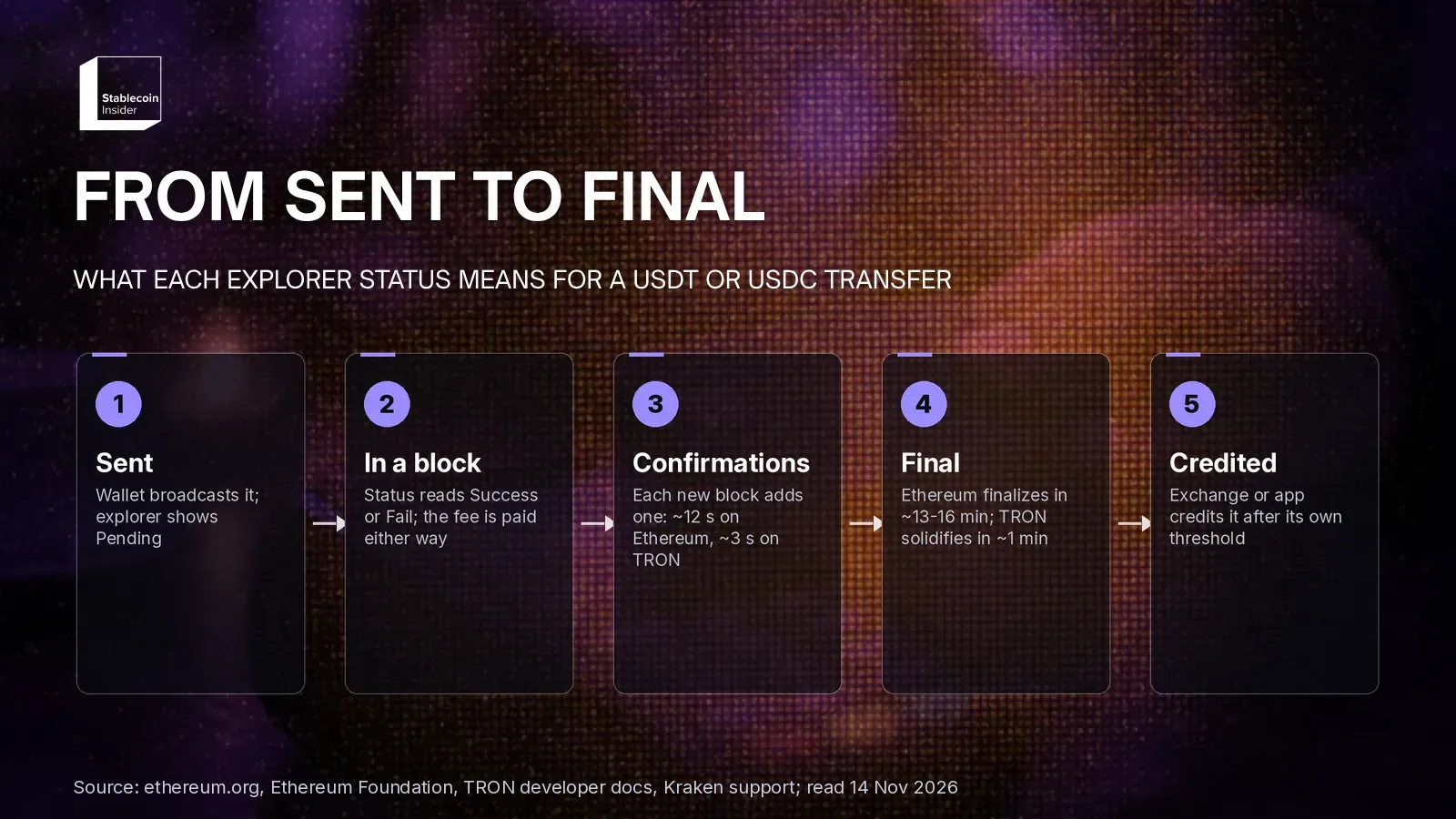
Our example shows the gap. At 11:24 CET, 13 minutes after inclusion, Etherscan's block page still showed our block as "Unfinalized (Safe)". At the same time, three public Ethereum RPC endpoints (PublicNode, dRPC and Flashbots) reported the newest finalized block as 26,412,509, 30 blocks before ours. By 11:27 CET the finalized block had moved to 26,412,541, so our transfer became final 13 to 16 minutes after inclusion, in line with the expected time. During that window it had dozens of confirmations but was not yet final.
TRON works differently. Its 27 Super Representatives produce a block every 3 seconds, and a block is solidified once 19 of them have built on it, "typically in about 1 minute" (TRON developers). When we queried TronGrid at 11:19 CET, the latest block was 87,992,564 and the latest solidified block 87,992,545, 19 blocks behind.
How long do exchanges wait before crediting USDT or USDC?
Exchanges wait for their own confirmation threshold before crediting USDT or USDC, and it differs by network. The table shows Kraken's published rules for common stablecoin networks, from its deposit processing times page (last updated 22 October 2026, read 14 November 2026). Other exchanges set their own numbers.
| Network | Kraken deposit rule | Protocol finality |
|---|---|---|
| Ethereum | USDT and USDC: ~20 min | Finalized after two epochs, ~13–16 min (EF) |
| TRON | USDT: 20 confirmations, near-instant. USDC not listed | Solidified by 19 of 27 SRs, ~1 min (TRON) |
| Solana | USDT and USDC: near-instant | "Finalized" commitment level (Solana) |
| Polygon | USDT and USDC: 250 confirmations, ~25 min | Set by Polygon |
| Arbitrum One | USDT and USDC: ~20 min | Set by Arbitrum |
| Base | USDC: ~20 min. USDT not listed | Set by Base |
The pattern is clear: Kraken lists TRON and Solana stablecoin deposits as near-instant, while Ethereum, Arbitrum, Base and Polygon take about 20 to 25 minutes. If your explorer shows "Success" but the exchange still says "Processing", Kraken defines that status as "confirming on its respective digital assets network" (Kraken), so waiting is usually the answer.
How do you check a USDT transfer on TRON?
You check a USDT transfer on TRON the same way: paste the transaction ID into Tronscan and confirm the result is SUCCESS, the contract is USDT's TRON address TR7NHqjeKQxGTCi8q8ZY4pL8otSzgjLj6t (Tether), and the amount and recipient match. The fee is where TRON differs, because it is paid in Bandwidth and Energy rather than gas.
We read the raw receipt of a 1,002 USDT transfer in block 87,992,514 (11:17 CET) through TronGrid. It used 64,285 Energy and burned 0.345 TRX for Bandwidth. The receipt shows no TRX burned for Energy and no Energy supplied by the contract deployer, so the sender's account covered all of it; under TRON's resource model, that Energy comes from staked or delegated TRX.
| Fee component | From the receipt | At TRX $0.3136 |
|---|---|---|
| Bandwidth (TRX burned) | 345,000 sun = 0.345 TRX | about $0.11 |
| Energy used | 64,285, covered by stake or delegation | $0 paid in TRX |
| Energy if paid by burning TRX | 64,285 × 100 sun = 6.43 TRX | about $2.02 |
The last row uses the energy price of 100 sun per unit in TRON's live chain parameters and CoinGecko's TRX price, both read at 11:19 CET. That gap is why the same TRC-20 transfer can cost cents for a sender with staked or rented Energy and about $2 for one without. Our guide to the cheapest way to send USDT on TRON compares Energy rental, staking and GasFree.
What red flags should you look for on an explorer?
The red flags to look for on an explorer are a wrong token contract, a wrong network, a lookalike address and a status that never resolves.
- Wrong contract: a token named "USDT" or "USDC" at an address that is not on the issuer's list. Etherscan adds a public note to some transactions involving tokens "without updated info" to help users spot fake and spoof tokens (Etherscan). Our guide on checking the official USDC or USDT contract covers each chain.
- Wrong network: the hash only resolves on a different explorer than the one your recipient uses. See how to recover USDC sent to the wrong network.
- Lookalike address: incoming transfers you did not expect from an address that matches yours or a contact's at the start and end. That is the pattern described in our address poisoning guide.
- Stuck or dropped: a "Pending" Ethereum transaction that later shows "Dropped" or "Replaced" never moved funds; check the replacement hash instead.
Sent the payment and it still is not credited? See why "confirmed" is not always "received". For the full picture, see our Stablecoin Payments and Cards Hub.
FAQ
Is a block explorer page proof of payment?
Can a confirmed USDT or USDC transfer be reversed?
What do processed, confirmed and finalized mean on Solana?
What does it mean if my exchange deposit is on hold?
Why did I pay a fee on a failed transaction?
Sources: Etherscan Information Center, Viewing Transactions on Etherscan; Etherscan, example USDT transaction; Etherscan, block 26,412,539; ethereum.org, Gas and fees; ethereum.org, Gasper; Ethereum Foundation, Upgrading finality; TRON developers, Consensus and DPoS; TRON developers, Transactions; TRON developers, Resource Model; TRON developers, TronGrid; Kraken, Cryptocurrency deposit processing times; Kraken, Cryptocurrency deposit statuses; Tether, Supported protocols; Circle, USDC contract addresses; Solana docs, Configuring state commitment; CoinGecko, Ethereum price; CoinGecko, TRON price; PublicNode Ethereum RPC. All read on 14 November 2026.
This content is provided for informational and educational purposes only and doesn't constitute financial, investment, legal or tax advice. The example transactions, block status, fees, ETH and TRX prices and Kraken deposit rules were read on 14 November 2026 and change constantly; gas use and finality times vary by transaction and network conditions. Mentions of USDT, USDC, Tether, Circle, Etherscan, Tronscan, TronGrid, Kraken, Bybit, CoinGecko or PublicNode are not endorsements. Always confirm the network, contract and recipient address before sending funds.